
To ensure the stability and security of the functions, Zhongyi Browser will regularly release version updates (such as optimizing the compatibility of fingerprint environment, fixing known bugs, etc.). The following provide two update methods to meet the different user needs, and the operations are simple and easy to use.
1. Manual update: Uninstall the old version → Download the latest version from the official website and install it.
It is suitable for users who need to thoroughly remove the remnants of old versions or when automatic updates fail. The operation steps are clear and controllable.
Step 1: Uninstall the current outdated version
Based on the equipment system, select the corresponding uninstallation method:
Uninstalling Windows system
- Press Win + R to open the Run dialog box → Enter appwiz.cpl → Click "OK" to open "Programs and Features";
- Find "Zhongyi Browser" in the program list → Right-click → Select "Uninstall".
- Follow the instructions to complete the uninstallation;
Uninstalling macOS system
- Open "Finder" → Enter the "Applications" folder;
- Locate the "Zhongyi Browser" icon → Drag it to the "Trash Bin".
Step 2: Download the latest version from the official website
- Open your browser and visit the official website of ZYBrowser: https://www.zhongyiliulanqi.com;
- Click on "Software Download" in the navigation bar → Select the corresponding system (Windows/macOS) → Click the "Download" button;
- After the download is complete, check the integrity of the installation package (for Windows, it is an .exe file, and for macOS, it is a.dmg file).
Step 3: Install the latest version
- Windows: Double-click the .exe installation package → Follow the wizard to complete the installation;
- macOS: Double-click the.dmg file → Drag the "Zhongyi Browser" icon to the "Applications" folder → Follow the prompts to authorize during the first startup (if you encounter security prompts, refer to the installation tutorial for solutions).
2. Automatic update: Internal detection within the app → One-click download and installation
Suitable for users who value convenience. The application will automatically detect updates when launched, eliminating the need for manual operation.
Step 1: Start the old version of ZYBrowser
Open the previously installed old version of Zhongyi Browser and wait for the main interface to load completely.
Step 2: Trigger automatic update detection
- Initial startup check: After opening the browser, if a new version is detected, there will be a corresponding update prompt (if no prompt appears, you can try restarting the software);
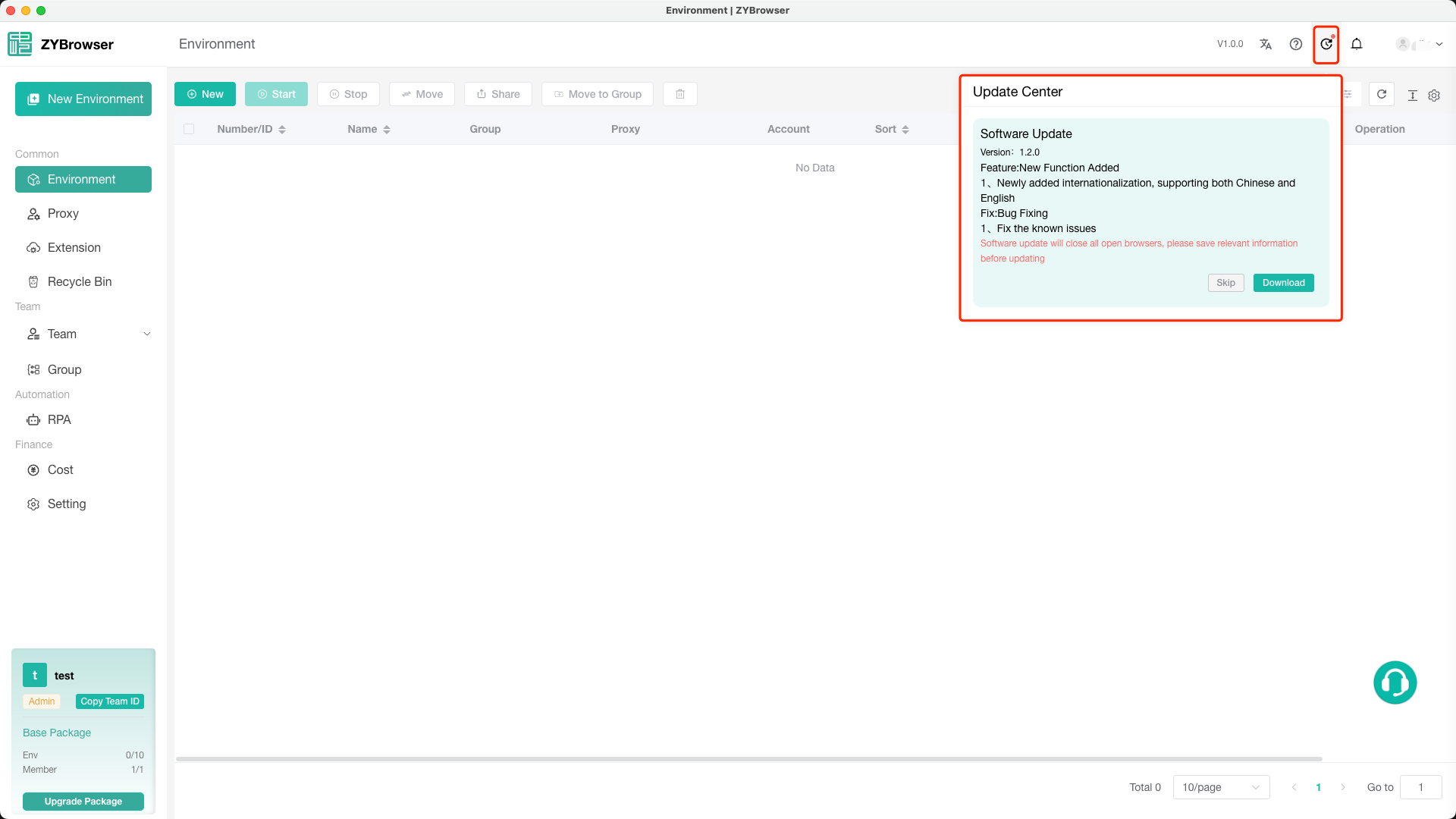
Step 3: Complete the update according to the instructions
The update prompt window usually contains the following information:
Update Log: Briefly describe the updated contents of the new version;
Update Button: Click "Download" (clicking the "Skip" button indicates skipping this version, and subsequent updates for this version will no longer be prompted).
Click to enter the download process:
- The download progress bar is displayed at the bottom of the interface.
- After the download is complete, click "Install".
- After clicking the "Install" button, the software will automatically exit (this operation will close all the currently opened environments. Please save the relevant information before proceeding). Proceed with the installation operation.
Matters need attention
- Manual update for residual handling: If the installation fails after uninstallation, it might be because the residual files were not cleaned up properly. You can use a third-party cleaning tool (such as CCleaner) to scan and remove system junk.
- Solution for automatic update failure: If no update is detected, you can try:
- Check the network connection (requires a connected state);
- Manually visit the official website to download the latest version (refer to Step 2 of the manual update process);
- Contact the customer service for feedback;
By using either of these two methods, you can flexibly choose the appropriate update method to ensure that Zhongyi Browser remains up-to-date at all times, allowing you to enjoy more secure and stable multi-account management and privacy protection features.
If you have any other questions, you can contact the online customer service on the official website at any time for support~